
Overview
The Relationships feature allows you to bind another plan’s minimum and maximum prices to the current plan’s price. You can define these limits using either fixed dollar values ($) or percentage values (%).
.png?width=374&height=374&name=Ref%20(10).png)
As the parent plan’s price changes, the linked (child) plan’s min and max update automatically — ensuring it always stays within your defined range.
The child plan’s live price remains independent but is constrained to operate within those dynamic limits.
Steps
Step 1: Access the Relationships Tab
- Open the desired pricing plan in your Trellis dashboard.
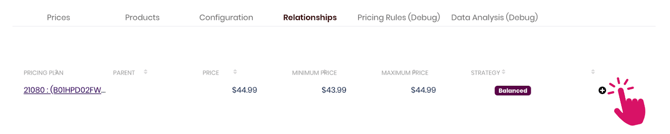
- Navigate to the Relationships tab.
Click the “+” button to create a new relationship.
Step 2: Add a Relationship
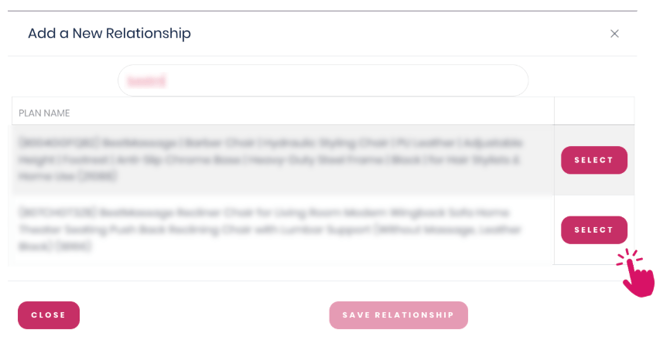
- In the relationship window, search for the plan you want to bind.
- Select it — this plan becomes the Child, while your current plan acts as the Parent.
- The parent’s current price determines the dynamic limits (Min/Max) for the child plan.
- The parent’s current price determines the dynamic limits (Min/Max) for the child plan.
- Click Save Relationship to link the two plans.
Step 3: Set Relationship Rules
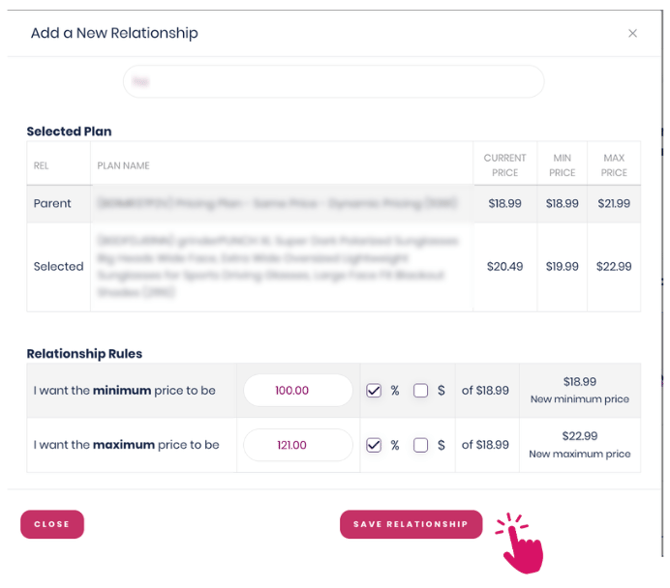
- Define how the Child plan’s Min and Max prices will follow the Parent plan’s price.
- Choose between a $ offset or a % offset to set how far above or below the Parent’s price the Child’s limits should stay.
- Save your changes.
These settings create dynamic boundaries — the linked plan’s Min and Max values automatically adjust as the parent price moves.
However, the child plan’s live price can still fluctuate within that defined range.
Example Use Case: Different Pack Sizes
When a product is sold in multiple pack sizes (e.g., single unit, 3-pack, 6-pack), you can use relationships to keep consistent price differences:
- Set the single unit plan as the Parent.
- Bind the larger packs as Child plans.
- Define Min/Max boundaries tied to the single unit’s price.
This ensures price consistency across all pack sizes while allowing each to adjust independently within safe limits.
💡 Tip:
Use relationships to prevent large pack discounts or small pack markups from drifting too far apart. This maintains brand consistency and avoids pricing confusion across product variations.