---
title: How to Report Using the Pricing Dashboard
description: how-to-report-using-the-pricing-dashboard
---
[Skip to content](https://support.gotrellis.com/en/knowledge-base/how-to-report-using-the-pricing-dashboard#main-content)
[](https://gotrellis.com/)
- [Home](https://gotrellis.com/)
Show submenu for Home
- [Advertising](https://gotrellis.com/advertising-ppc-automation/)
- [Dynamic Pricing](https://gotrellis.com/dynamic-pricing/)
- [AI-Content Optimization](https://gotrellis.com/product-content/)
- [Promotions](https://gotrellis.com/promotions/)
- [Pricing](https://gotrellis.com/pricing/)
- [Blog](https://gotrellis.com/blog/)
- [Contact](https://gotrellis.com/contact-us/)
Open main navigation
Close main navigation
- [Home](https://gotrellis.com/)
Show submenu for Home
- [Advertising](https://gotrellis.com/advertising-ppc-automation/)
- [Dynamic Pricing](https://gotrellis.com/dynamic-pricing/)
- [AI-Content Optimization](https://gotrellis.com/product-content/)
- [Promotions](https://gotrellis.com/promotions/)
- [Pricing](https://gotrellis.com/pricing/)
- [Blog](https://gotrellis.com/blog/)
- [Contact](https://gotrellis.com/contact-us/)
- [Log In](https://app.gotrellis.com/)
[Log In](https://app.gotrellis.com/)
How can we help you?
- There are no suggestions because the search field is empty.
1. [Trellis Knowledge Base](https://support.gotrellis.com/en/knowledge-base?hsLang=en)
2. [Dynamic Pricing](https://support.gotrellis.com/en/knowledge-base/dynamic-pricing?hsLang=en)
# How to Report Using the Pricing Dashboard
## Learn how to navigate the Dynamic Pricing Dashboard and analyze performance across pricing plans using filters, metrics, charts, and detailed tables.
#### **Navigation**
To open the pricing reporting view:
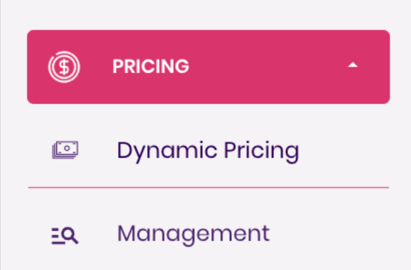
1. Go to the **Pricing** dropdown in the left-side navigation panel.
2. Select **Dynamic Pricing** — this opens the Pricing Dashboard.
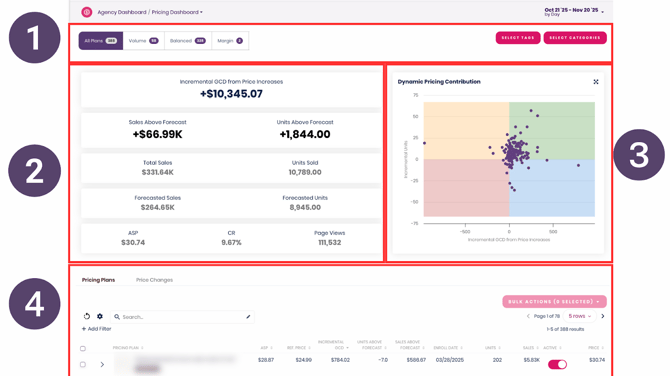
Once the dashboard is open, you’ll see four main components:
1. **Filters & Lenses**
2. **Metrics Table**
3. **Pricing Plans Graph**
4. **Detailed Table Review**
Each section helps you understand how your pricing plans are performing and where to take action.
#### **1. Filters & Lenses**
The Filters section lets you narrow the data shown in the Metrics Table and Pricing Plans Graph.
### **Strategy Filters**
The first filter group lets you filter[pricing plans by the strategy](https://support.gotrellis.com/en/knowledge-base/dynamic-pricing-strategies-cheat-sheet?hsLang=en)they use, such as:
- Volume-focused strategies
- Balanced strategies
- Margin-focused strategies
This allows you to compare how different strategies are performing against each other (e.g., “How are my volume plans doing vs. my margin plans?”).

### **Category & Tag Filters**
The second filter group allows you to filter pricing plans by:
- Product category
- Assigned pricing plan tags
This helps you drill into specific segments, such as reviewing performance for a specific brand, division, or product grouping.

#### **2. Metrics Table**
The [Metrics Table](https://support.gotrellis.com/en/knowledge-base/dynamic-pricing-dashboard-glossary?hsLang=en) gives you a high-level view of your pricing plan performance.
Key metrics include:
### **Gross Contribution Dollars (GCD)**
If positive, GCD shows revenue gained from price increases.
If negative, it becomes **Volume Retention Cost (VRC)**, reflecting revenue lost due to price decreases.
### **Sales Above Forecast**
Measures how actual sales compare to expected sales based on forecast models.
### **Units Above Forecast**
Shows how many more (or fewer) units were sold compared to forecasted units.
This metric effectively represents the impact of price changes on **conversion rate**, expressed in unit terms.
For detailed definitions, see:
**DP Dashboard Glossary**
#### **3. Pricing Plans Graph**
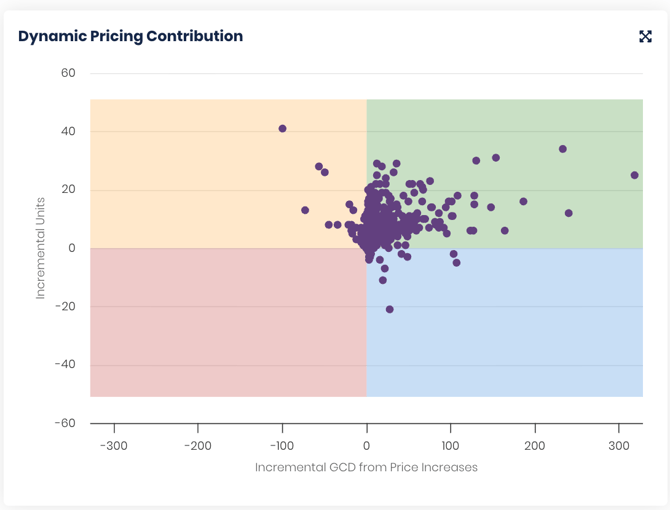
The Pricing Plans Graph plots each pricing plan across two axes:
- **GCD** (value impact of price changes)
- **Incremental Units** (conversion impact of price changes)
The graph has four quadrants:
### **Green Quadrant — GCD Up, Units Up**
Price ↑ and demand ↑ simultaneously.
Indicates strong plan performance.
### **Blue Quadrant — GCD Up, Units Down**
Price ↑ but demand ↓.
Typical of **margin-focused** strategies aiming for higher profitability.
### **Orange Quadrant — Units Up, GCD Down**
Volume ↑ but price ↓.
Typical of **volume-focused** strategies aiming to boost unit sales.
### **Red Quadrant — GCD Down, Units Down**
Both value and demand ↓.
Plans here require attention and potential adjustments.
This graph is the fastest way to identify which plans are outperforming or underperforming.
****
#### **4. Detailed Table Review**
The bottom portion of the dashboard includes a full table of all pricing plans and their performance details.
In this section, you can:
- Sort any column
- Filter by any relevant attribute
- Review SKU-level and plan-level pricing changes
- Identify trends or anomalies in plan performance
Just like all tables in Trellis, you can customize the view to focus on the metrics that matter most to you.
### Video Walkthrough - How to Read the Dynamic Pricing Dashboard
- [Getting Started](https://support.gotrellis.com/en/knowledge-base/getting-started?hsLang=en)
- [Advertising](https://support.gotrellis.com/en/knowledge-base/advertising?hsLang=en#main-content)
- [Media Plan Settings](https://support.gotrellis.com/en/knowledge-base/advertising?hsLang=en#media-plan-settings)
- [How To](https://support.gotrellis.com/en/knowledge-base/advertising?hsLang=en#how-to)
- [FAQs](https://support.gotrellis.com/en/knowledge-base/faqs?hsLang=en)
- [Dynamic Pricing](https://support.gotrellis.com/en/knowledge-base/dynamic-pricing?hsLang=en#main-content)
- [Pricing Strategies](https://support.gotrellis.com/en/knowledge-base/dynamic-pricing?hsLang=en#pricing-strategies)
[](https://gotrellis.com/)
[mailto:support@gotrellis.com](mailto:support@gotrellis.com)
Copyright © 2025, Trellis Corporation
```json
{
"@context" : "https://schema.org",
"@type" : "VideoObject",
"contentUrl" : "https://6658395.fs1.hubspotusercontent-na1.net/hubfs/6658395/video_assets/222064757306/inherited/web_optimized.mp4",
"dateModified" : "2026-09-16T20:39:51.569Z",
"duration" : "PT4M44S",
"height" : 1080,
"name" : "D1 Dynamic Pricing - Dashboard",
"thumbnailUrl" : "https://6658395.fs1.hubspotusercontent-na1.net/hubfs/6658395/D1%20%20%20Dynamic%20Pricing%20-%20Dashboard.mp4/medium.jpg",
"uploadDate" : "2026-09-16T20:39:51.567Z",
"width" : 1880
}
```