
Overview
Dayparting lets you adjust bids based on the time of day or day of week.
This is helpful when your sales follow predictable patterns — for example, when conversions spike during evening hours or weekends.
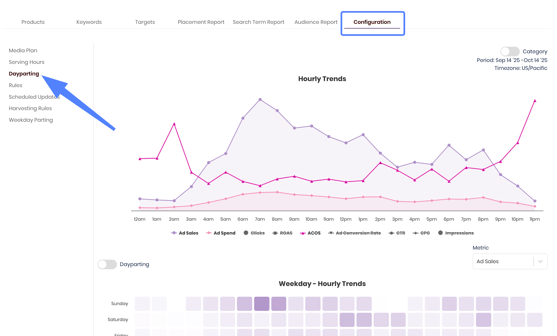
You’ll find this in Configuration -> Dayparting.
Example
| Time Range | Multiplier | Description |
|---|---|---|
| 8 AM – 1 PM | 0.8x | Reduce bids during low-traffic hours. |
| 1 PM – 7 PM | 1.5x | Increase bids during peak shopping times. |
💡 When Trellis’s automation is already enabled, dayparting will slightly weight spend during high-performing hours — not to replace overall optimization. The two systems can work hand in hand to optimize spend.
Interaction with Other Multipliers
When both Dayparting and Placement Multipliers are active:
-
Dayparting is applied first (time-based adjustment).
-
Placement Multiplier is then applied on top of the resulting bid.
Example:
Base bid = $1
Dayparting (2x) → $2
Placement Multiplier (50% for Top of Search) → $3 total
Enable Dayparting
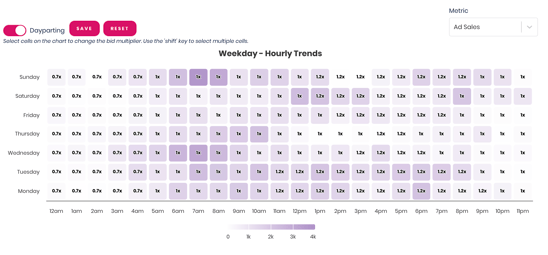
- Click on the Dayparting Toggle
- Select which cells (hours/days) you would like to adjust the multiplier.
- Update the multiplier
- Less than 1x leads to a bid decrease during those hours
- More than 1x leads to a bid increase during those hours.
- Click Save once dayparting setup has been complete in order to apply.
💡 Tip: You can apply Dayparting in Bulk through any of the ad reports using Bulk Actions
Video Walkthrough - Configuration Tab, Serving Hours, and Dayparting