---
title: Managing Organization Settings
description: Manage you Trellis Organization Settings
---
[Skip to content](https://support.gotrellis.com/en/knowledge-base/managing-organization-settings#main-content)
[](https://gotrellis.com/)
- [Home](https://gotrellis.com/)
Show submenu for Home
- [Advertising](https://gotrellis.com/advertising-ppc-automation/)
- [Dynamic Pricing](https://gotrellis.com/dynamic-pricing/)
- [AI-Content Optimization](https://gotrellis.com/product-content/)
- [Promotions](https://gotrellis.com/promotions/)
- [Pricing](https://gotrellis.com/pricing/)
- [Blog](https://gotrellis.com/blog/)
- [Contact](https://gotrellis.com/contact-us/)
Open main navigation
Close main navigation
- [Home](https://gotrellis.com/)
Show submenu for Home
- [Advertising](https://gotrellis.com/advertising-ppc-automation/)
- [Dynamic Pricing](https://gotrellis.com/dynamic-pricing/)
- [AI-Content Optimization](https://gotrellis.com/product-content/)
- [Promotions](https://gotrellis.com/promotions/)
- [Pricing](https://gotrellis.com/pricing/)
- [Blog](https://gotrellis.com/blog/)
- [Contact](https://gotrellis.com/contact-us/)
- [Log In](https://app.gotrellis.com/)
[Log In](https://app.gotrellis.com/)
How can we help you?
- There are no suggestions because the search field is empty.
1. [Trellis Knowledge Base](https://support.gotrellis.com/en/knowledge-base?hsLang=en)
2. [Getting Started](https://support.gotrellis.com/en/knowledge-base/getting-started?hsLang=en)
# Managing Organization Settings
## Set up your workspace by inviting team members, managing billing access, and configuring organization-wide settings like reporting preferences and optimization targets.
#### 👥 Invite and Manage Team Members
### Steps
Navigate to **Settings → Invite Users**.
**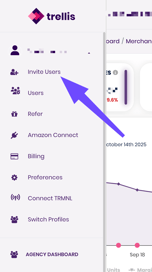**
Enter your teammate’s **email address**.
Click **Invite User**.
Your teammate will receive an email to join your Trellis workspace. Once accepted, their status changes from **Pending** to **Active**.
🔒 **Note:** Only **Admins** can manage users and roles. You can adjust permissions later at any time.
💡 **Tip:** Agencies managing multiple brands can assign each brand a separate organization (workspace) for cleaner reporting and billing separation. All brands can then be connected through the Agency Dashboard for combined reports.
---
#### 💳 Manage Billing Access
### Steps
Go to **Settings → Billing**.
Review your current **subscription plan** and **payment method**.
Click **Manage Billing** to:
- Update payment details
- Download past invoices
💡 **Tip:** Only Admin users can view or edit billing information. Marketers and Analysts will not see this tab.
---
### 🧮 Reporting Preferences
#### ROAS vs ACoS Reporting
Choose your preferred reporting metric for ad performance:
- **ROAS (Return on Ad Spend):** Shows how much revenue is generated for every dollar spent.
- **ACoS (Advertising Cost of Sale):** Shows the percentage of revenue spent on ads.
To switch between them:
1. Go to **Settings → Preferences**
2. Select **Default Reporting Metric**
3. Choose either **ROAS** or **ACoS**
💡 **Tip:** Both metrics will still be available through the reports.
---
#### SKU vs ASIN Reporting
Define how Trellis groups product performance in reports:
- **ASIN Level:** Ideal for single listings or product-specific ad tracking.
- **SKU Level:** Best for variations or multi-pack listings where you want performance broken down by SKU.
To change your default reporting level:
1. Go to **Settings → Organization → Reporting Preferences**
2. Select **Default Reporting View**
3. Choose **ASIN** or **SKU**
💡 **Tip:** Trellis automatically maps SKUs to ASINs — changing this view only affects reporting display, not campaign structure.
- [Getting Started](https://support.gotrellis.com/en/knowledge-base/getting-started?hsLang=en)
- [Advertising](https://support.gotrellis.com/en/knowledge-base/advertising?hsLang=en#main-content)
- [Media Plan Settings](https://support.gotrellis.com/en/knowledge-base/advertising?hsLang=en#media-plan-settings)
- [How To](https://support.gotrellis.com/en/knowledge-base/advertising?hsLang=en#how-to)
- [FAQs](https://support.gotrellis.com/en/knowledge-base/faqs?hsLang=en)
- [Dynamic Pricing](https://support.gotrellis.com/en/knowledge-base/dynamic-pricing?hsLang=en#main-content)
- [Pricing Strategies](https://support.gotrellis.com/en/knowledge-base/dynamic-pricing?hsLang=en#pricing-strategies)
[](https://gotrellis.com/)
[mailto:support@gotrellis.com](mailto:support@gotrellis.com)
Copyright © 2025, Trellis Corporation