
👥 Invite and Manage Team Members
Steps
Navigate to Settings → Invite Users.
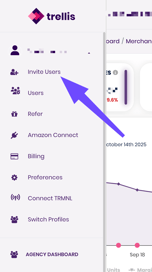
Enter your teammate’s email address.
Click Invite User.
Your teammate will receive an email to join your Trellis workspace. Once accepted, their status changes from Pending to Active.
🔒 Note: Only Admins can manage users and roles. You can adjust permissions later at any time.
💡 Tip: Agencies managing multiple brands can assign each brand a separate organization (workspace) for cleaner reporting and billing separation. All brands can then be connected through the Agency Dashboard for combined reports.
💳 Manage Billing Access
Steps
Go to Settings → Billing.
Review your current subscription plan and payment method.
Click Manage Billing to:
-
Update payment details
-
Download past invoices
💡 Tip: Only Admin users can view or edit billing information. Marketers and Analysts will not see this tab.
🧮 Reporting Preferences
ROAS vs ACoS Reporting
Choose your preferred reporting metric for ad performance:
-
ROAS (Return on Ad Spend): Shows how much revenue is generated for every dollar spent.
-
ACoS (Advertising Cost of Sale): Shows the percentage of revenue spent on ads.
To switch between them:
-
Go to Settings → Preferences
-
Select Default Reporting Metric
-
Choose either ROAS or ACoS
💡 Tip: Both metrics will still be available through the reports.
SKU vs ASIN Reporting
Define how Trellis groups product performance in reports:
-
ASIN Level: Ideal for single listings or product-specific ad tracking.
-
SKU Level: Best for variations or multi-pack listings where you want performance broken down by SKU.
To change your default reporting level:
-
Go to Settings → Organization → Reporting Preferences
-
Select Default Reporting View
-
Choose ASIN or SKU
💡 Tip: Trellis automatically maps SKUs to ASINs — changing this view only affects reporting display, not campaign structure.