---
title: Setting Advanced Days on Hand Rules
description: setting-advanced-days-on-hand-rules
---
[Skip to content](https://support.gotrellis.com/en/knowledge-base/setting-advanced-days-on-hand-rules#main-content)
[](https://gotrellis.com/)
- [Home](https://gotrellis.com/)
Show submenu for Home
- [Advertising](https://gotrellis.com/advertising-ppc-automation/)
- [Dynamic Pricing](https://gotrellis.com/dynamic-pricing/)
- [AI-Content Optimization](https://gotrellis.com/product-content/)
- [Promotions](https://gotrellis.com/promotions/)
- [Pricing](https://gotrellis.com/pricing/)
- [Blog](https://gotrellis.com/blog/)
- [Contact](https://gotrellis.com/contact-us/)
Open main navigation
Close main navigation
- [Home](https://gotrellis.com/)
Show submenu for Home
- [Advertising](https://gotrellis.com/advertising-ppc-automation/)
- [Dynamic Pricing](https://gotrellis.com/dynamic-pricing/)
- [AI-Content Optimization](https://gotrellis.com/product-content/)
- [Promotions](https://gotrellis.com/promotions/)
- [Pricing](https://gotrellis.com/pricing/)
- [Blog](https://gotrellis.com/blog/)
- [Contact](https://gotrellis.com/contact-us/)
- [Log In](https://app.gotrellis.com/)
[Log In](https://app.gotrellis.com/)
How can we help you?
- There are no suggestions because the search field is empty.
1. [Trellis Knowledge Base](https://support.gotrellis.com/en/knowledge-base?hsLang=en)
2. [Dynamic Pricing](https://support.gotrellis.com/en/knowledge-base/dynamic-pricing?hsLang=en)
# Setting Advanced Days on Hand Rules
## Goal: Understand how Days on Hand rules work in Dynamic Pricing and how inventory-aware buckets influence automated pricing strategies.
#### **Inventory Aware Dashboard**
The **Inventory Aware** tab on the Dynamic Pricing dashboard shows how your SKUs are distributed across four inventory health buckets:
- **Deficient**
- **Healthy**
- **Excess**
- **Overstock**
These buckets help the Trellis system decide when to raise, hold, or decrease prices based on supply levels.
Bucket thresholds are fully configurable and can be adjusted in the [**Configuration** tab.](https://support.gotrellis.com/en/knowledge-base/advanced-configuration-settings?hsLang=en)
#### **How Inventory Buckets Are Calculated**
Inventory buckets are determined as a **percentage of your target Days on Hand**.
- Default target: **90 Days on Hand**
- Changing the target automatically updates all bucket thresholds
- This ensures your [Pricing strategy](https://support.gotrellis.com/en/knowledge-base/dynamic-pricing-strategies-cheat-sheet?hsLang=en) always aligns with your inventory objectives
For example, if you change your target from 90 days to 120 days, the cutoff points for each bucket shift accordingly.
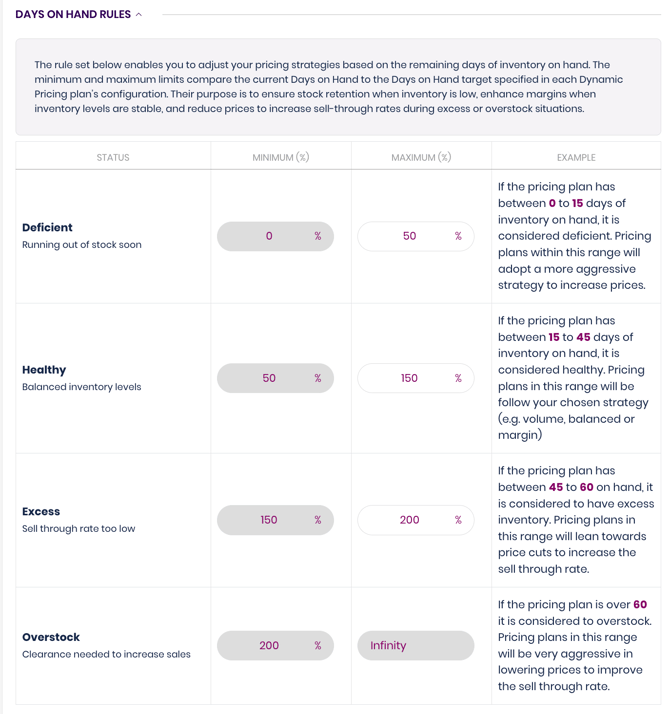
#### **Default Days on Hand Buckets & Strategies**
### **Deficient | Default: 0–50%**
*Running out of stock soon*
- Applies **margin strategy**
- Raises **price to slow down velocity and preserve remaining stock**
### **Healthy | Default: 50–150%**
*Balanced inventory levels*
- Applies **balanced strategy**
- Optimizes for steady revenue while maintaining stable velocity
### **Excess | Default: 150–300%**
*Sell-through rate too low*
- Applies **boost volume plan**
- Reduces price moderately to improve sell-through
### **Overstock | Default: 300%+**
*Clearance needed to increase sales*
- Applies **max volume plan**
- Aggressively lowers price to clear high inventory levels
#### **Managing Days on Hand Rules**
You can customize:
- Your **target Days on Hand**
- Each bucket’s **minimum and maximum thresholds**
- The pricing strategy Trellis applies within each bucket
These customizations allow you to reflect your own supply chain strategy — whether conservative, aggressive, or seasonal.
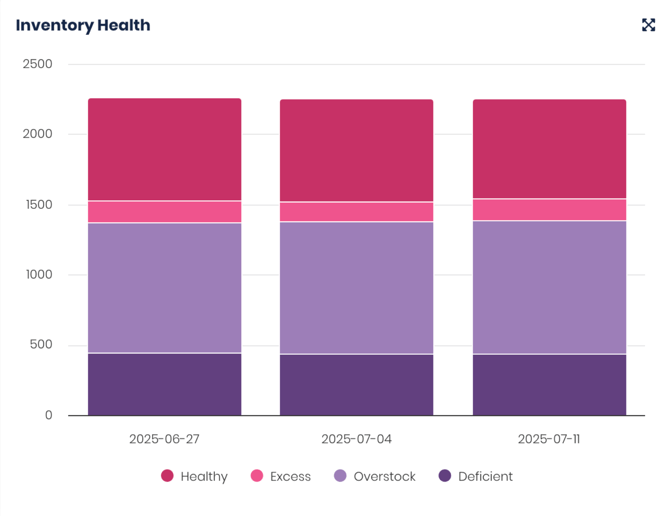
#### **Example From the Dashboard**
The chart visualizes how many SKUs fall into each bucket across selected dates, helping you:
- Track changes in inventory health
- Identify categories at risk of stockout
- Spot overstock issues early
- Validate whether price strategy is influencing inventory appropriately
- [Getting Started](https://support.gotrellis.com/en/knowledge-base/getting-started?hsLang=en)
- [Advertising](https://support.gotrellis.com/en/knowledge-base/advertising?hsLang=en#main-content)
- [Media Plan Settings](https://support.gotrellis.com/en/knowledge-base/advertising?hsLang=en#media-plan-settings)
- [How To](https://support.gotrellis.com/en/knowledge-base/advertising?hsLang=en#how-to)
- [FAQs](https://support.gotrellis.com/en/knowledge-base/faqs?hsLang=en)
- [Dynamic Pricing](https://support.gotrellis.com/en/knowledge-base/dynamic-pricing?hsLang=en#main-content)
- [Pricing Strategies](https://support.gotrellis.com/en/knowledge-base/dynamic-pricing?hsLang=en#pricing-strategies)
[](https://gotrellis.com/)
[mailto:support@gotrellis.com](mailto:support@gotrellis.com)
Copyright © 2025, Trellis Corporation