
🏷️ What Are Product Tags?
Tags are internal labels that help you organize and segment products within Trellis.
They don’t sync to Amazon — they’re purely for your internal workflows.
Use tags to:
-
Group Top Performers or Seasonal Products
-
Identify New Launches or Clearance Items
-
Track High Margin or Low Inventory products
-
Build targeted Media Plans or custom reports
Steps
-
Go to Reports → Product Report (or any page where products can be selected).
-
Use the filters or search to find the products you want to tag.
-
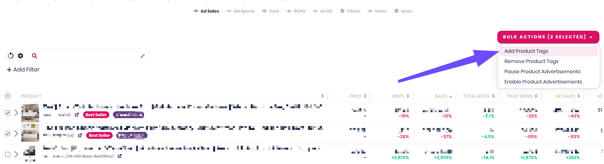
Select one or multiple products using the checkboxes.
-
Click Bulk Actions → Add Tag.
-
Enter a new tag name or select from existing tags.
-
Click Apply.
💡 Tip: You can apply multiple tags to a single product. Tags are searchable in all reporting and campaign filters, so they’re great for organizing across teams.
Example Use Cases
| Use Case | Tag Example |
|---|---|
| Seasonal planning | “Q4 Products”, “Holiday Gift Guide” |
| Profit-based grouping | “High Margin”, “Low Margin” |
| Product lifecycle | “New Launch”, “Discontinued Soon” |
| Ad targeting | “Priority SKUs”, “Brand Awareness Set” |