---
title: Understanding Media Plans in Trellis
description: Media Plans in Trellis
---
[Skip to content](https://support.gotrellis.com/en/knowledge-base/understand-media-plans-in-trellis#main-content)
[](https://gotrellis.com/)
- [Home](https://gotrellis.com/)
Show submenu for Home
- [Advertising](https://gotrellis.com/advertising-ppc-automation/)
- [Dynamic Pricing](https://gotrellis.com/dynamic-pricing/)
- [AI-Content Optimization](https://gotrellis.com/product-content/)
- [Promotions](https://gotrellis.com/promotions/)
- [Pricing](https://gotrellis.com/pricing/)
- [Blog](https://gotrellis.com/blog/)
- [Contact](https://gotrellis.com/contact-us/)
Open main navigation
Close main navigation
- [Home](https://gotrellis.com/)
Show submenu for Home
- [Advertising](https://gotrellis.com/advertising-ppc-automation/)
- [Dynamic Pricing](https://gotrellis.com/dynamic-pricing/)
- [AI-Content Optimization](https://gotrellis.com/product-content/)
- [Promotions](https://gotrellis.com/promotions/)
- [Pricing](https://gotrellis.com/pricing/)
- [Blog](https://gotrellis.com/blog/)
- [Contact](https://gotrellis.com/contact-us/)
- [Log In](https://app.gotrellis.com/)
[Log In](https://app.gotrellis.com/)
How can we help you?
- There are no suggestions because the search field is empty.
1. [Trellis Knowledge Base](https://support.gotrellis.com/en/knowledge-base?hsLang=en)
2. [Advertising](https://support.gotrellis.com/en/knowledge-base/advertising?hsLang=en)
# Understanding Media Plans in Trellis
## Learn what a Media Plan is, how Trellis structures your Amazon Ads campaigns, and how optimization strategies like ROAS Boost or Growth Max work within that framework.
💡 *See also:*
- [How to Create a Media Plan](https://support.gotrellis.com/en/knowledge-base/how-to-create-a-media-plan?hsLang=en)
#### 🧠 What Is a Media Plan?
A **Media Plan** is the campaign container Trellis uses to manage your Amazon Ads.
It’s where your **products, targets, and optimization strategies** come together under one plan.
When you create a Media Plan, Trellis automatically:
- Builds the correct **campaign structure** in Amazon (with the right ad groups, match types, and negations).
- Syncs performance data for each keyword, ASIN, and placement.
- Applies the **optimization strategy** you choose — Trellis then manages bids and budgets daily to hit your target ACoS or growth goals.
💡 **Think of a Media Plan** as the single source of truth for your campaign.
All your reporting, targeting, and optimization settings live here.
---
#### 🧩 How Media Plans Work
Every Media Plan includes the following key components:
| Component | Description |
| --- | --- |
| **Products** | The ASINs or SKUs you want to advertise. Each product can be linked to multiple ad groups or keywords. |
| **Targets** | The keywords or ASINs you’re bidding on. Trellis automatically manages these via discovery and harvesting. |
| **Ad Groups** | Logical groupings of products + targets. Trellis creates separate ad groups for match types and ad types to improve performance. |
| **Optimization Strategy** | Defines how Trellis adjusts your bids. Choose between [ROAS Boost, Growth Max, Product Launch, Placement Max or Only Rules](https://support.gotrellis.com/en/knowledge-base/understanding-how-trellis-algorithms-optimize-your-amazon-ads?hsLang=en). |
| **Advanced Settings** | Controls harvesting, match types, bid ranges, and other fine-tuning options. |
| **Amazon Options** | Sets bid strategy (Up/Down, Fixed, Down Only) and placement modifiers (Top of Search, Product Pages, etc.). |
---
#### ⚙️ Optimization Strategies
When building a Media Plan, you’ll select how Trellis should optimize your campaigns.
| Strategy | Best For | What It Does |
| --- | --- | --- |
| **ROAS Boost** | Profitability-focused advertisers | Keeps bids within your min/max ACoS range to maintain stable returns. |
| **Growth Max** | Aggressive scaling | Pushes bids toward the higher end of your ACoS range to maximize visibility and traffic. |
| **Product Launch** | New product introductions | Maximizes bids for strong early market presence and rapid sales acceleration. |
| **Placement Max** | Products with strong placement preferences | Utilizes bid multipliers to ensure that the products are showing up only on the best performing placements. |
| **Only Rules** | Experienced advertisers | Allows you to define custom rule-based optimizations manually. |
---
#### 🔄 Campaign Lifecycle in Trellis
1. **Create or Enroll** a Media Plan (new or existing campaigns).
2. Trellis begins **data collection** and optimization.
3. The algorithm continuously:
- Adjusts bids per target and match type. (See below image for example of continual bid changes to achieve ACOS target and grow sales)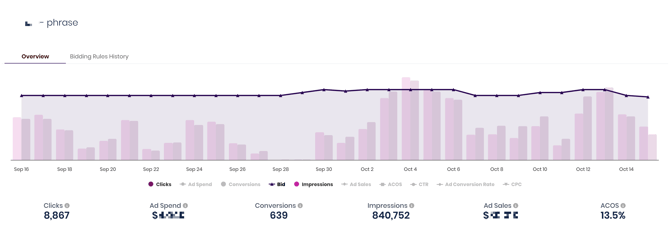
- Harvests and negates keywords automatically (dependent on settings)
- Balances budget allocation across ad groups.
4. View performance in **Reports → Advertising Report** or directly from your Media Plan dashboard.
---
💡 **Tip:** Every Media Plan in Trellis represents one or more campaigns in Amazon Ads.
You never need to manually create the ad group structure — Trellis automates that for you based on best practices.
- [Getting Started](https://support.gotrellis.com/en/knowledge-base/getting-started?hsLang=en)
- [Advertising](https://support.gotrellis.com/en/knowledge-base/advertising?hsLang=en#main-content)
- [Media Plan Settings](https://support.gotrellis.com/en/knowledge-base/advertising?hsLang=en#media-plan-settings)
- [How To](https://support.gotrellis.com/en/knowledge-base/advertising?hsLang=en#how-to)
- [FAQs](https://support.gotrellis.com/en/knowledge-base/faqs?hsLang=en)
- [Dynamic Pricing](https://support.gotrellis.com/en/knowledge-base/dynamic-pricing?hsLang=en#main-content)
- [Pricing Strategies](https://support.gotrellis.com/en/knowledge-base/dynamic-pricing?hsLang=en#pricing-strategies)
[](https://gotrellis.com/)
[mailto:support@gotrellis.com](mailto:support@gotrellis.com)
Copyright © 2025, Trellis Corporation